How to Convert Text to 3D
Turn any text prompt into a downloadable 3D model in three simple steps no design skills needed.
Write Your Prompt
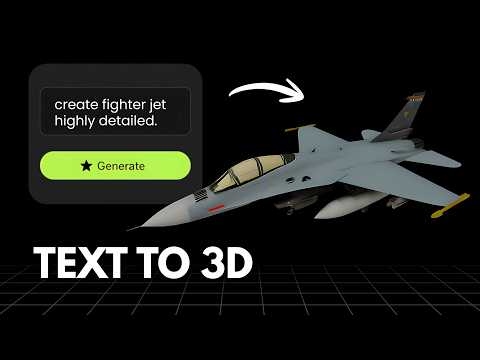
Describe what you want in plain text. The more detail you add shape, material, style, color the more accurate your 3D model will be.
AI Builds Your 3D Model
Our AI first generates a high-quality image from your text, then automatically converts it into a full 3D model. The whole process takes 60 to 90 seconds.
Preview & Download
Inspect your model in the interactive 3D viewer, then download it in GLB, STL or OBJ format ready for printing, games or design.
Use Cases of Text to 3D
Discover how Text to 3D helps creators, developers and educators turn written ideas into ready-to-use 3D models.
Game Development
Describe a character, weapon or prop in plain text and get a ready-to-use 3D asset without sculpting from scratch.
Concept Art & Ideation
Quickly visualize an idea in 3D straight from a written description, perfect for early-stage brainstorming and pitches.
3D Printing & Prototyping
Turn a written design idea into a printable mesh and hold a physical prototype without ever opening 3D software.
Product Concepting
Describe a product idea and generate a 3D mockup to explore shapes and variations before committing to a photoshoot.
Education & Visualization
Bring textbook descriptions, historical objects or scientific concepts to life as interactive 3D models for learning.
AR & VR Content Creation
Generate lightweight 3D assets from text prompts to quickly populate AR filters, VR scenes and immersive experiences.
Frequently Asked QuestionsFrequently
Asked
Questions
Type a description of what you want for example, "a futuristic spaceship" or "a medieval castle". Our AI first generates a high-quality image from your text, then automatically converts it into a fully downloadable 3D model.
The more descriptive your prompt, the better the result. Include details like shape, material, style, and color. For example, "a round wooden barrel with metal rings and a dark oak texture" will produce a much more accurate model than just "a barrel".
Text to 3D typically takes 60 to 90 seconds as it runs two AI steps image generation followed by 3D reconstruction. You can preview and download the model as soon as it is ready.
You can download your 3D models in GLB (for web and real-time use), STL (for 3D printing), and OBJ (compatible with most 3D software like Blender, Maya and Cinema 4D).
Each Text to 3D generation costs 10 credits. Credits are deducted only on a successful generation.
Yes, a free account is required to generate 3D models. You can sign in with Google or use a Magic Link sent to your email with no password needed.
Yes, Vega3D generates fully textured models with color baked directly onto the mesh, so your model looks complete right out of the box, no manual texturing required.
Yes, models you generate from your text prompts are yours to use in commercial projects, including games, products, marketing, and 3D printing.
Yes, once generated you can download the GLB or OBJ file and refine the mesh, retopologize, or adjust textures in software like Blender, Maya, or Cinema 4D.
Yes, Vega3D runs fully in the browser, so you can write a prompt and generate a 3D model from your phone or tablet without installing any app.